
If you've been paying attention to the latest trends in the film and television industries, you've likely noticed the growth of verticals and microdramas. We discussed the dynamics of these new platforms before, but now we look at the practical side of writing them using Final Draft's two vertical screenplay templates: Micro Drama and ReelShort Vertical Drama.
What Are Verticals and Micro Dramas?
Designed specifically for smartphones, these bite-sized scripted stories have become one of the fastest-growing storytelling platforms. Episodes are short, usually running just one to three minutes each, and are packed with cliffhangers, twists, and turns within each episode. They are designed to keep audiences swiping to the next installment, allowing viewers to experience cinematic storytelling paired with the swiping habits of billions of people worldwide.
How Micro Dramas Are Different From Traditional Screenwriting
Micro dramas aren't just super short screenplays. They are structured around an entirely different kind of viewing experience.
Traditional feature-length screenplays tell one continuous story across an average industry-preferred length of 90 to 115 pages. Television and streaming platform episodic series scripts tell stories that range from multiple episodes in a single season to multi-seasonal story and character arcs. Episode teleplays are anywhere from 30 to 60 pages, give or take.
With micro dramas, the visual platform is designed as serialized storytelling where each episode ends on a cliffhanger or twist that keeps viewers scrolling for the next installment to see what happens. A single season of a micro drama may contain 40, 50, 60, or 100 episodes, with, again, each episode only lasting one to three minutes.
Where feature-length and episodic screenwriters think in story acts for each screenplay or teleplay, micro drama writers think in episodes, with each ending in a way that compels viewers to keep scrolling to the next installment.
Despite the structural differences between micro dramas and movie/television scripts, the formatting is actually very similar.
Micro Drama Format
The format looks almost exactly like traditional screenwriting format. You'll still use the normal screenwriting format fundamentals like:
- Scene Headings
- Action/Scene Description
- Character Names
- Dialogue
- Parantheticals
- Transitions
Don't worry, if you've written screenplays before, you'll be able to grasp the micro drama format with ease. The biggest difference isn't how they are written; it's how they are organized.
The Micro Drama Episode Element
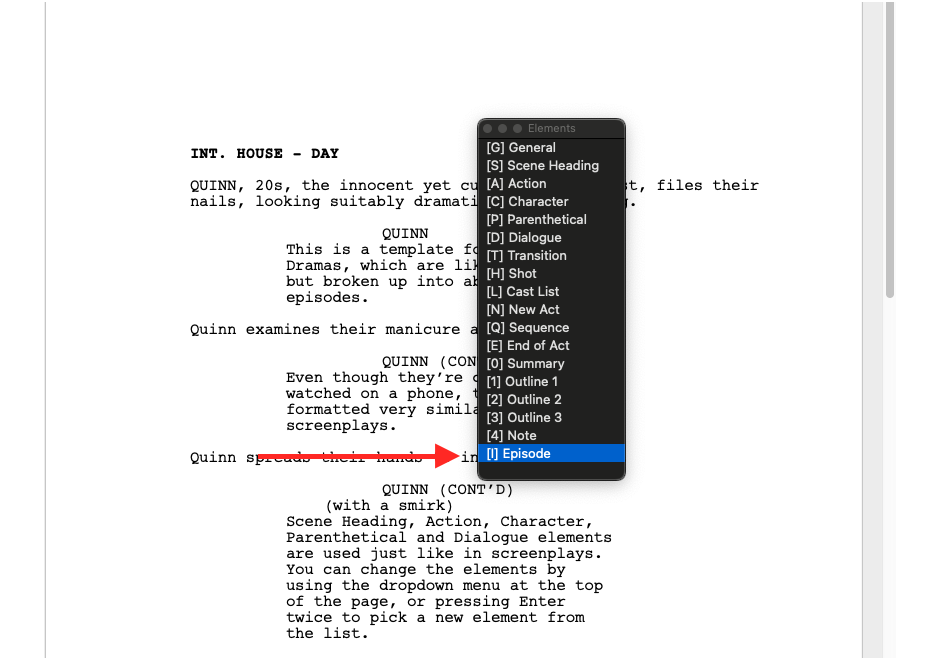
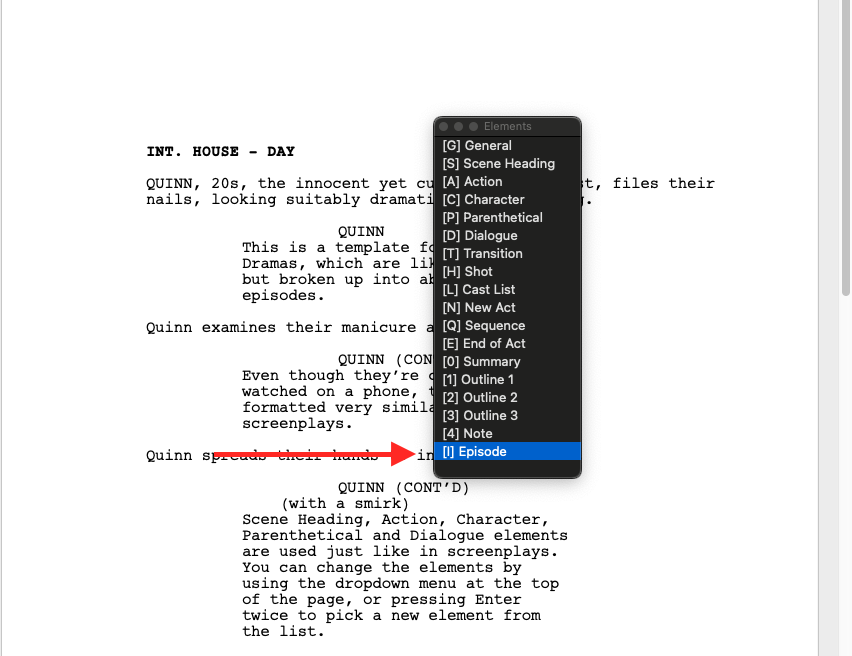
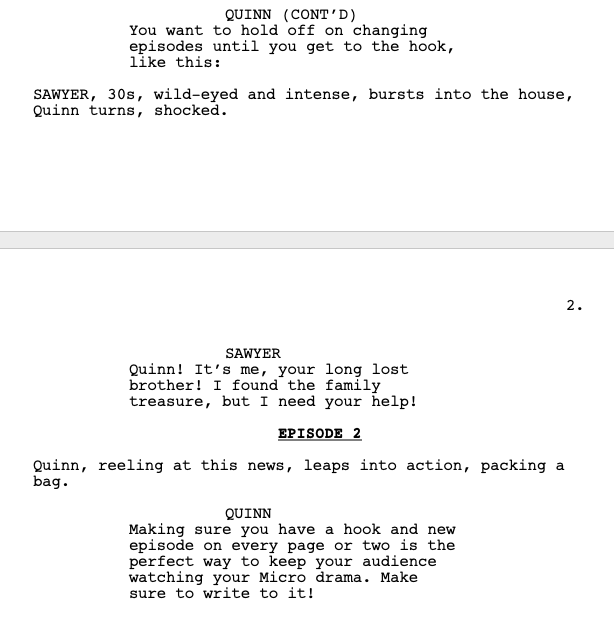
The defining feature of the Micro Drama template is the Episode Element. This element is built into the template and can be selected via the Elements dropdown or pressing Enter on a blank line, just like any other element in Final Draft.
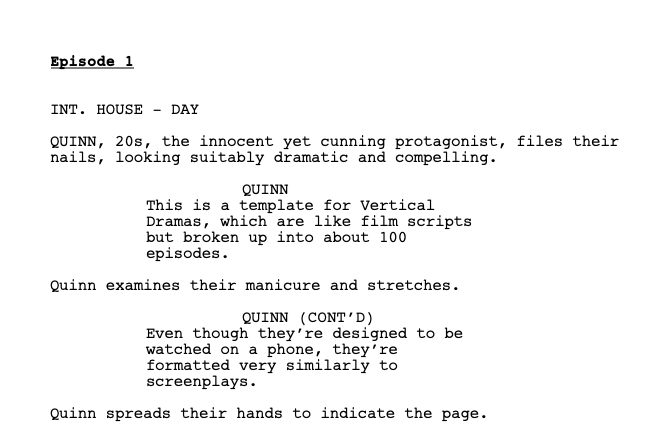
This element doesn't exist in traditional screenplay formatting because traditional screenplays aren't divided into dozens upon dozens of short installments. Instead, each episode clearly identifies the beginning of every new chapter in your serialized story. The episode element is the backbone of the micro drama format, communicating to the director(s), cast, and crew where each new episode begins. Rather than writing 100 one- to three-page scripts, you'll write all 100 episodes (or however long you want your micro drama to be) in one document, with the episode element working as a place card to show where each new micro drama episode begins.
Not Every Micro Drama Episode Has a New Scene or Location
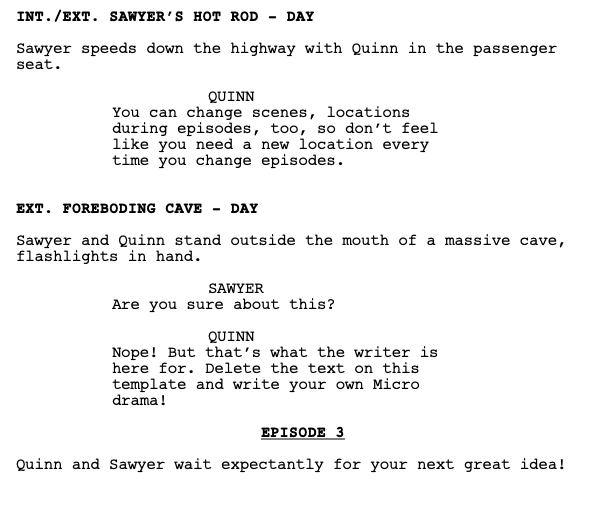
It's important to note that micro dramas can often remain in the same scene and/or same location for multiple episodes. Just because a new episode begins doesn't mean we're starting a new scene in a new location. Some micro dramas stay within the same scene or location for the whole season.
That said, a single episode can contain multiple scenes and locations. It's just that each episode is so short that staying in the same scene and location for multiple episodes is usually the case for a majority of episodes.
Micro Dramas Come in All Genres
While the term micro dramas may make screenwriting newcomers think that these types of stories are all taking place under the genre umbrella of dramas, nothing could be further from the truth. Micro dramas come in all shapes, sizes, and genres.
Most micro dramas fall under the drama genre umbrella, but as the vertical storytelling platform has grown, creators are beginning to explore more and more genres.
The Micro Drama Template
Final Draft's Micro Drama Template was designed to fit the formatting needs for all micro dramas, creating a universal format that micro drama writers can utilize.
Accessing the Template
Within Final Draft 13:
- Go to File > New from Template (or select New from Template from the opening screen)
- Open the TV Category
- Select Micro Drama
What appears will be three episodes of sample content showcasing the formatting while utilizing the dialogue to creatively explain additional dynamics of the platform.
You can then copy and delete that sample content, and start your own micro drama script by clicking Enter on your keyboard and selecting Episode on the drop-down menu. This will take your cursor to the proper center margin where you will type EPISODE 1 (which will automatically be in CAPS, bold, and underlined).
When you click Enter after that, the cursor will automatically move you to the Scene Heading element on the left margin. From that point on for the first episode, all of the screenwriting elements from traditional screenplays will be applied, with the exception of each Scene Heading appearing in bold. You'll then repeat this process for every episode, starting the next episode by pressing Enter on your keyboard when on a blank line and selecting Episode on the Drop Down Menu.
The ReelShort Vertical Drama Template
The ReelShort Vertical Drama template produces the same overall script and format, with a couple of different variances developed in collaboration with ReelShort, one of the largest vertical drama applications in the world, and its productions.
Accessing the Template
Within Final Draft 13:
- Go to File > New from Template (or select New from Template from the opening screen)
- Open the TV Category
- Select ReelShort Vertical Drama
You can then repeat the steps we detailed in the Micro Drama template to get your script started.
The differences between the two templates are subtle:
- Instead of centering Episode headings in all CAPS, the ReelShort template in the left margin in Title Case.
- Scene Headings use standard formatting instead of the Micro Drama template's bold.
- When you hit Enter after writing the Episode section, the cursor goes to the Action element instead of Scene Heading.
Which Template Should You Use?
It really depends on who you are writing for. The Micro Drama template works for virtually any vertical drama or micro drama project, whereas the ReelShort Vertical Drama template is designed in collaboration with the ReelShort platform to reflect their formatting preferences for vertical dramas.
If you're writing for ReelShort, you would obviously want to utilize their preferred template. If you're writing on spec (under speculation that you'll sell the project to a buyer), it's best to go with the more universal Micro Drama template.