
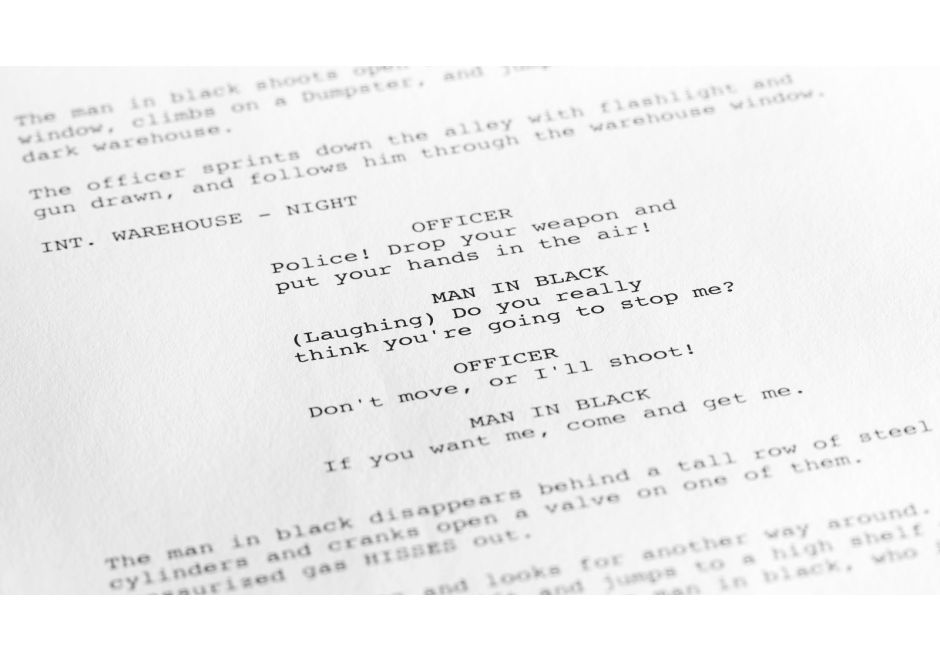
If you open almost any produced screenplay from 1975's Jaws to 2026's Project Hail Mary, you'll notice that despite the decades separating them, the formatting looks remarkably similar.
There's a reason for that. Screenplays aren't just creative writing documents for writers to tell their stories. They are technical documents designed to communicate a cinematic story as efficiently as possible for multiple collaborators to interpret and bring to life.
Screenwriting format has remained largely unchanged for generations because these simple formatting elements are easy to communicate not just for the reading experience, but also for script breakdowns for production purposes.
- Scene Headings
- Action/Scene Description
- Character Names
- Dialogue
- Parentheticals (only when necessary)
- Transitions (only when necessary)
Those are all of the elements needed to write a screenplay. Every screenwriter — new, seasoned, or pro — utilizes these same formatting elements, which puts everyone on an even playing field to tell their stories.
One of the most important elements of screenwriting format is the Scene Heading. Every screenplay has them. Everyone who reads a screenplay relies on them. Yet this formatting element is also one of the most misunderstood elements for beginning screenwriters who often try to cram too much information into their scene headings.
Understanding what belongs in a Scene Heading, and what doesn't, is one of the easiest ways to make your script look professional and easy-to-read.
What Is a Scene Heading?
A Scene Heading communicates three essential visual elements that help readers visualize what they are supposed to be imagining, and, even more importantly, what is supposed to be seen on the screen.
- Is the scene outside (EXT.) or inside (INT.)?
- Where does the scene take place (LOCATION)?
- Does it take place at night (NIGHT) or during the day (DAY)?
That's it. That is all that is needed to set up a scene visually.
What Is the Standard Format of a Scene Heading?
Scene Headings are always in ALL CAPS.
A standard Scene Heading should follow this format:
INT. LOCATION - DAY
EXT. LOCATION - NIGHT
For example:
INT. HOUSE - DAY
EXT. FIELD - NIGHT
Without reading a single line of scene description, the reader will be able to envision where the scene is taking place, whether it's inside or outside, and whether the scene takes place during the daytime light hours or at night where there is little-to-no natural light.
These examples are the basic standard format screenwriters can start with in their scene headings.
What SHOULD Be in a Scene Heading?
The Scene Heading format is very simple, and should be kept that way at all times. It's a way to communicate the essential production information.
Interior or Exterior
Every single Scene Heading should start with one of the following, and no other variance:
INT. (Interior)
EXT. (Exterior)
These abbreviations tell the reader what to envision, and tell production whether an interior or exterior set or location is needed.

Location
The primary location is the next element after INT. or EXT. This is where that whole scene takes place.
INT. HOSPITAL
EXT. BEACH
INT. POLICE STATION
EXT. PLAYGROUND
The location should be specific enough that readers instantly understand where the action occurs, and production knows exactly what type of location is needed.
Instead of:
INT. BUILDING
You can write:
INT. SCHOOL
Instead of:
INT. HOUSE
You can write:
INT. JACK'S HOUSE
When you're specific, you help the reader visualize exactly where they are while also helping production know which filming locations or sets are needed.
Locations Within Locations
Sometimes the primary location isn't specific enough. Imagine your character enters a large house. Multiple scenes may occur in various locations within that large house.
- Kitchen
- Livingroom
- Bathroom
- Someone's bedroom
The primary location should always be featured first, then followed by a space, dash, another space, and then the secondary location follows.
INT. JACK'S HOUSE - JACK'S BEDROOM
INT. DIANE'S HOUSE - LIVING ROOM
The locations within Scene Headings should always be uniform. If you were to establish the above Scene Headings in a script, you should write them the exact same way each and every time. If you feature additional secondary locations, you should always establish the first primary location the exact way you did before.
This helps production perform production reports for budgeting, location scouting, and set building.
Time of Day
This is the final formatting element of Scene Headings.
You generally want to only use these two options — DAY or NIGHT.
Readers need to know whether to visualize a scene with daylight or at night. Writing DAY or NIGHT in your Scene Heading lets them know.
Sometimes you'll also see variations like:
- DAWN
- DUSK
- EARLY MORNING
- MORNING
- EVENING
These variations can give even greater description to the time of day and the variances of light.
Same, Later, or Continuous
Within the time of day element, you sometimes need to utilize one of these three variances.
- SAME is used when you've already established DAY or NIGHT in one Scene Heading, and then are writing additional scenes that take place during that SAME exact time. This comes into play during locations/scenes that are intercut between each other (phone calls, scenes happening at different locations but at the exact same time).
- LATER is used when the script stays in the exact same location, but time has passed to a LATER time.
- CONTINUOUS is often misused. It should only be used when you've already established DAY or NIGHT in one Scene Heading, but then a character moves from one location to the next instantly.
Example #1 (SAME)
INT. JACK'S HOUSE - JACK'S BEDROOM - NIGHT
Jack texts Dianne.
INT. DIANE'S HOUSE - DIANE'S BEDROOM - SAME
Dianne reads his text and smiles.
Example #2 (LATER)
INT. JACK'S HOUSE - JACK'S BEDROOM - NIGHT
Jack falls asleep.
INT. JACK'S HOUSE - JACK'S BEDROOM - LATER
Jack wakes up from a nightmare.
Example #3 (CONTINUOUS)
INT. DIANNE'S HOUSE - LIVING ROOM - NIGHT
Dianne looks out the window and across the street to Jack's bedroom window. She's worried. She contemplates her next move and rushes out the front door.
EXT. DIANNE'S HOUSE - CONTINUOUS
Dianne runs out of the house and across the street to Jack's house.
Keep Scene Headings Short
Scene Headings should never go over one line. Newer screenwriters can sometimes be tempted to turn Scene Headings into miniature descriptions, leading to very long Scene Headings that don't show up on script breakdown reports very well.
Correct Version:
INT. ABANDONED WAREHOUSE - NIGHT
Overwritten Version:
INT. OLD, DUSTY, ABANDONED WAREHOUSE THAT HASN'T BEEN USED IN YEARS - NIGHT
The latter is far too long. That type of detail is best saved for the scene description, like this:
INT. ABANDONED WAREHOUSE - NIGHT
It's old, dusty, and clearly hasn't been used in years.
What Should NOT Be in a Scene Heading
The short answer to the question of what should not be in a Scene Heading is anything beyond what we described in the above examples.
Some writers make the mistake of trying to communicate every screenplay device they are trying to use within the Scene Heading. They'll use Scene Headings to communicate:
- Flashbacks
- Dream sequences
- Dates
- Times
These elements and details don't need to be in the Scene Headings. You can format Flashbacks and Dream Sequences using the Action/Scene Description lines.
How to Properly Format Flashbacks and Dream Sequences
For flashbacks, you can simply write FLASHBACK: on its own line, then write the Scene Heading for the flashback location(s). When the flashback is over, type END FLASHBACK on its own slugline. You can also consider putting Flashback scenes in italics so they stand out.
Example:
FLASHBACK:
EXT. FOOTBALL FIELD - NIGHT
Tyler's football team is playing in the state championship. He lines up in the receiver position, the ball is hiked, and he runs his route with speed and precision. He then looks up for the ball and catches it with skill! Touchdown!
END FLASHBACK
The same can be done for a DREAM SEQUENCE as well.
DREAM SEQUENCE:
EXT. FOOTBALL FIELD - NIGHT
Tyler's football team is playing in the state championship. He lines up in the receiver position, the ball is hiked, he runs his route with speed and precision. He then looks up for the ball and catches it with skill! Touchdown!
END DREAM SEQUENCE
This is the best and most straightforward way to write these types of scenes. Some scripts have used the Scene Heading to showcase a flashback or dream sequence.
EXT. FOOTBALL FIELD - NIGHT (FLASHBACK)
EXT. FOOTBALL FIELD - NIGHT (DREAM)
While it wouldn't be the end of the world to utilize this variant, it does go against the directive and guideline of keeping Scene Headings as short and simple as possible. When in doubt, try not to use the Scene Heading to communicate flashbacks or scene descriptions.
Dates and Times
Some screenwriters try to use the Scene Heading to showcase dates or times.
EXT. PEARL HARBOR - DECEMBER 7TH, 1941 - DAY
INT. DONUT SHOP - 9:00 AM - DAY
A date or time isn't something that can be visualized specifically after reading it in the Scene Heading. Those details should be shared (if necessary) in the scene description that follows the Scene Heading.
Better Versions:
EXT. PEARL HARBOR - DAY
It's December 7th, 1941.
INT. DONUT SHOP - DAY
It's 9:00 in the morning. Open for business.
Readers don't need to see dates or times in the Scene Heading. They always look to the scene description for additional information about the location of the scene.
INT./EXT. Shortcuts and Crutches
Some scripts use Scene Heading shortcuts to avoid writing additional Scene Headings.
For example, if a character is in a car, the screenwriter may be visualizing shooting and editing choices that show some interior shots within the car, and some exterior shots of the car from the outside. So, they'll write a Scene Heading like this:
INT./EXT. CAR - DAY
Production can't use that as a Scene Heading that they can break down for scheduling, location scouts, set builds, etc.
When this appears in screenplays, the screenwriter is asking the reader to visualize the scene however they would like. It's actually frustrating for the reader to be put in that position. When most readers see that type of Scene Heading, it can slow the read down as they try to figure out what is supposed to be seen. And any time you slow down the read for the reader, you're losing the momentum and breaking their focus.
It helps the reader when the writer just makes the decision of what should be seen, and then writes out the Scene Headings and scene description that describes the specific visuals to be visualized.
Lesser Version:
INT./EXT. CAR - DAY
Diane gets in her car and drives off. She calls Jack on her phone and waits for him to answer.
When do we envision the outside shot of the car? When do we switch to being inside the car? We don't know what to envision. Tell us.
Better Version:
EXT. CAR - DAY
Diane gets in her car and drives off.
INT. CAR - SAME
She calls Jack on her phone and waits for him to answer.
Always try to avoid the shortcut of having the reader decide what to envision, and how to envision it. That's the screenwriter's job.
Let the Scene Description Do the Heavy Lifting
Here's a useful rule of thumb to follow when it comes to what should and shouldn't be in the Scene Heading:
If the information isn't helping the reader or production identify where and what time of day the scene is taking place, it probably doesn't belong in the Scene Heading.
The Scene Heading tells us where we are, and whether or not it's during daylight or nighttime.
The Scene Description tells us what we are seeing. This is where you establish:
- Time Periods
- Flashbacks
- Dream Sequences
- Mood
- Atmosphere
- Weather
- Visual Description
- Historical Context
- Emotional Tone
- Character Actions
All of those types of additional information and elements should always be in the scene description.
Keep Scene Headings Short and Simple
The readers will thank you for that, and so will production when they need to start breaking down the script and running script reports.